Turn your VODs into highlight clips automatically.
Paste a Twitch or YouTube VOD. Auto-Clipper watches every frame, finds the kills, combat, and explosions, and hands you ready-to-post clips — horizontal or vertical.
Free & open sourceNo account neededRuns locally on your PC
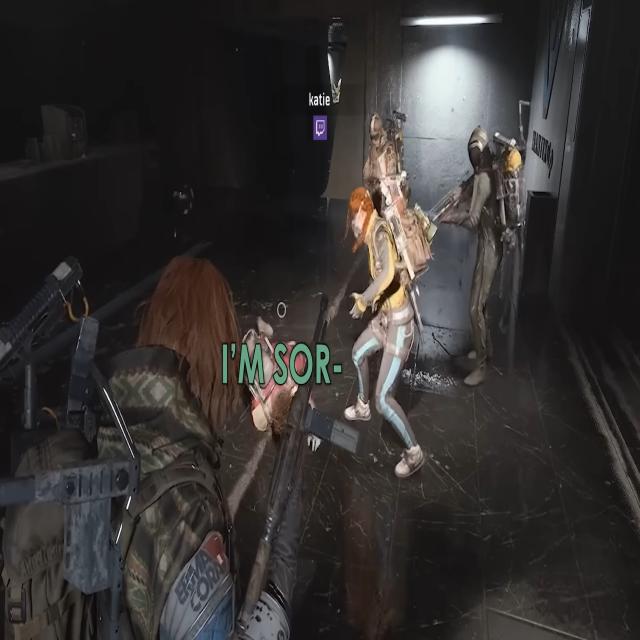
auto-clipper · analyzing arc_raiders_vod.mp4
raider · 97%
raider · 72%
raider · 89%
00:43:22 · frame 77,806 / 2,710,800
CLIP SAVED · HIGHLIGHT
Detected clips · 4 new12 total
03:14 · FIREFIGHT
08:42 · DOUBLE KILL
12:07 · EXTRACT
18:22 · AMBUSH
Features
Everything you need, nothing you don't.
Computer vision built for gaming. Works offline. Outputs clips you can drag straight into OBS, Premiere, or TikTok.
Game-tuned computer vision
Frame-by-frame HSV color detection, motion deltas, scene changes, audio spikes, and optional YOLO object detection — all scored together per game profile.
HSV ColorMotionAudioScene CutsYOLO
AI Mode
Optional xAI Grok Vision pass understands what is happening — not just colors and motion.
TikTok / Shorts export
One click converts any clip to vertical 9:16 with picker layouts — webcam, no-cam, or custom frame.
Local VOD library
Downloaded VODs stay on your machine. Re-analyze with a different profile in seconds — no re-download.
Preview & trim
Every clip gets a preview player with ±1s / ±5s trim buttons and instant re-cut. No external editor needed.
Built for real games
Per-game detection profiles — kill-feed colors, damage vignettes, explosion flashes, UI zones. Adding a game = adding a profile.
Runs on your PC, not the cloud
Your VODs never leave your computer. No uploads, no accounts, no data brokers. Just Python, FFmpeg, and your GPU.
New · Voice-triggered clipping
Say "clip it." We caught it.
A 30-second rolling buffer sits behind your live stream. The moment you yell "clip that" — we snip the last 30s, drop it in your library, and let you trim/extend it in the editor.
LISTENING · buffer full (30s)
"let's push this compound —"
"CLIP THAT" ✓ trigger
— saved clip: last 30s → editor
Pick your clipping mode
Switch per session. Combine for the most recall.
Trigger phrases:"clip it""clip that""clip this""save that""save clip"+ add your own
How it works
Three steps. Zero editing.
From stream URL to downloadable highlight clips in minutes — not hours of manual scrubbing.
01
Paste a VOD link
Drop a Twitch or YouTube URL. Or upload a local file. Want just a segment? Set a start/end time — it only downloads that part.
02
Let it scan
Auto-Clipper samples frames, runs color & motion detectors, aligns audio peaks, and scores every second. A 1-hour VOD takes ~3–5 min.
03
Review & post
Get a grid of clips with thumbnails, timestamps, and confidence bars. Preview, trim, download, or one-click convert to TikTok vertical.
Performance
Fast. Measured, not marketed.
Real numbers from the 0.12 release on a 10-second smoke test and a 1-hour Twitch VOD. Your mileage depends on GPU / CPU — MPS and CUDA are autodetected.
Pixel-only mode
28.6×realtime
CPU only. 10s smoke test → 0.35s wall time. No weights, no GPU, no accounts.
YOLO on Apple Silicon MPS
~6–8×realtime
1-hr VOD → ~8 min end-to-end including download. Autodetects MPS / CUDA / CPU.
Clip It voice scan
~5–10×realtime
Whisper audio-only transcription (faster-whisper backend). Each trigger → 30s clip.
-100%
Temp-JPEG writes removed. Numpy frames go straight to YOLO.
-30%
Wall time in YOLO-only mode — pixel analysis skipped when not needed.
Network calls required for default detection. 100% on-device.
Who it's for
Built for the grind.
If you've ever finished a 4-hour stream and faced the scrub bar, this is for you.
Twitch streamers
End your stream. Drop the VOD link. Get a 30-clip reel before you finish your water. Say "clip that" mid-stream for instant highlights.
Twitch / YouTube VOD URLs
Auto-export TikTok 9:16 vertical
Rolling 30s buffer via voice
Content creators
Short-form pipelines that used to take hours: paste, wait, trim, post. Stack multiple VODs into a batch and grab the best moments across sessions.
Batch analyze via library
Cut + trim without re-encoding
Preview before you commit
Competitive / coaching
Pull every kill + death + close-call from a scrim. YOLO classes tag raiders, turrets, and bosses so you can filter your review to specific encounter types.
Per-entity clip filters
Confidence-ranked library
Share links to specific timestamps
Supported games
Tuned per game. More coming.
Each detection profile is hand-tuned for that game's UI, colors, and visual effects. Request a game on GitHub — or add one yourself.
Live
Arc Raiders
Muzzle flash, damage vignette, arc glow, kill flares, XP pops, scanner beams, and more.
More profiles in progress. Want priority? File a GitHub issue with a sample VOD and we'll tune it next.
Vote on GitHub
Install
One command. Paste. Done.
Open Terminal, paste the line below, hit Enter. No warnings, no installers, no Gatekeeper dialogs.
The way to install · Mac & Linux
Paste one line in Terminal
Same pattern Homebrew uses. Files fetched via curl skip the macOS quarantine flag, so there's no "cannot verify" dialog — ever. The script clones the repo, installs Python + FFmpeg + deps, and launches the app.
Re-run it anytime to reinstall clean — wipes the old code, venv, and caches; keeps your VODs, clips, library, and YOLO weights untouched.
Same idempotent trick: clones if new, pulls if already there. Re-run anytime for a clean reinstall. Git + Python 3.11 required — see python.org (check "Add to PATH").
FAQ
Questions, answered.
Is it really free?
Yes. Auto-Clipper is MIT-style open source and runs entirely on your machine. There are no accounts, no paywalls, and no data uploaded anywhere. The only optional paid feature is AI Mode, which uses your own xAI API key.
Do I need a GPU?
No. The default detector is CPU-friendly HSV color + motion analysis — a modern laptop handles a 1-hour VOD in ~3–5 minutes. YOLO object detection also runs on CPU, but Apple Silicon (MPS) or CUDA makes it significantly faster. Device is autodetected.
Do I need to train a YOLO model first?
No. Auto-Clipper ships with a pre-trained Arc Raiders YOLO model (models/best.pt, ~5 MB stripped-optimizer checkpoint) that detects 13 entity classes — raider, bombardier, leaper, turret, fireball, and more. YOLO mode works the moment you install. If you want to retrain on newer gameplay or a different game, just overwrite models/best.pt with your own weights.
How is this different from Twitch auto-clips?
Twitch highlights are based on chat activity and moderators. Auto-Clipper watches the actual gameplay pixels — it finds the moment a kill happens, not the moment viewers reacted.
What games are supported?
Arc Raiders and War Thunder today. Each game needs a detection profile tuned for its UI, colors, and effects — the engine is the same. Request a game on GitHub or submit a pull request with a profile of your own.
Why isn't it a website I can just open and use?
Auto-Clipper processes full VODs with FFmpeg and OpenCV — that's gigabytes of video and heavy CPU work per user. Hosting it for free isn't feasible. Running locally keeps it free, private, and fast.
Can I contribute?
Please do. Adding a new game profile is the easiest first contribution — open a PR on GitHub. Detection tuning and new export formats also welcome.
Your next highlight reel is one paste away.
Clone, install, open in your browser. Zero sign-ups. Zero uploads. Just clips.